 Mira Forge
Obsidian plugin In Obsidian’s Community plugins browser
Cardsmith
Turn your notes into spaced-repetition flashcards with your own AI key or a local Ollama model. Review every card before it is saved (review is on by default and can be turned off in settings), then study in Obsidian or export to Anki.
Works with the Spaced Repetition plugin
Cards are written in the format the Spaced Repetition plugin reads, so they fit the review tools you already use.
Exports to Anki
Export any Spaced Repetition card, including ones you wrote by hand, to an Anki import file. No AI and no network needed for that.
Your AI, or ours with Pro
Use OpenAI, Anthropic, OpenRouter, any OpenAI-compatible endpoint, or Ollama on your own machine, and Mira Forge never sees your notes. Pro adds optional hosted generation with no key: it asks first, then sends the note through our service and OpenRouter to Google Vertex, with no training and no fallback; Google may keep it briefly for abuse monitoring. Details.
How it works
- In Settings → Cardsmith, choose a model provider. With Ollama, nothing leaves your computer. With a cloud provider, your API key is kept in Obsidian’s secret storage, not in your vault files.
- Open a note (or select part of it) and run Cardsmith: Generate flashcards from this note or selection.
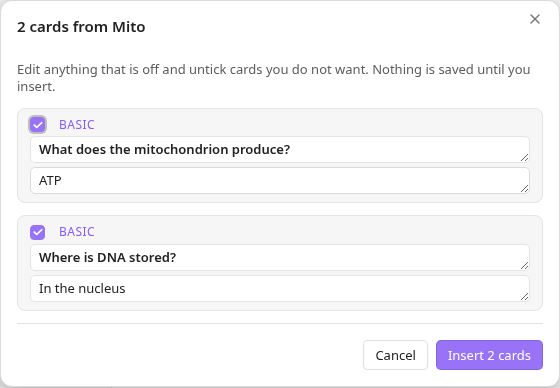
- Edit or untick cards in the review window, then insert them. Nothing is saved until you do (review is on by default and can be turned off in settings).
- Study with the Spaced Repetition plugin, or export to Anki and import the file with File → Import (Anki 2.1.55 or later).
Cards go into one clearly marked block at the end of the note. Running Cardsmith again replaces that block; the rest of your note is never touched.
%% cardsmith:start hash=1a1ac837 %%
#flashcards

What does the mitochondrion produce?::ATP
%% cardsmith:end %%
Basic cards use Question::Answer. Reversed cards (Term:::Definition) and cloze cards from ==highlights== are free too, in the Spaced Repetition plugin’s own syntax.
Free and Pro
Cardsmith is free for one note at a time, and each vault gets one free folder run of up to 5 notes. Cardsmith Pro is for working across folders and your whole vault. Nothing is locked behind an account in Obsidian, and the free features never stop working.
| Feature | Free | Pro |
|---|---|---|
| Generate cards from the current note or a selection | Included | Included |
| Review, edit and drop cards before they are saved (review is on by default and can be turned off in settings) | Included | Included |
| Basic question/answer cards | Included | Included |
| Cards per note | up to 10 | up to 50 |
| Export a note’s cards to Anki (offline) | Included | Included |
| Ollama, OpenAI, Anthropic, OpenRouter and custom OpenAI-compatible endpoints | Included | Included |
| Cloze and reversed cards | Included | Included |
| Generate for a whole folder in one run | once per vault, up to 5 notes | Included |
| Refresh only notes that changed since their cards were made | Not included | Included |
| Synced folders: count notes with new content and refresh them in one reviewed batch | one 5-note try (uses the free folder run) | Included |
| Export a folder or the whole vault to Anki, with decks from folders | Not included | Included |
| Custom instructions for the model | Not included | Included |
| Hosted generation, no API key needed (asks before sending anything; not during a free trial) | Not included | up to 300 a month, 30 an hour |
Cardsmith Pro, monthly
$3 / month, tax included
All Pro features. Renews monthly until you cancel, and you can cancel anytime.
Prices include any applicable sales tax or VAT: what you see is what you pay.
Install the free version first (see Install); you can add Pro any time from Cardsmith’s settings.
- One license key works on up to 3 devices. Removing the license in settings frees a device.
- Your key appears on screen right after checkout. Lost it? Recover it with your email and the invoice number from your Link receipt, or email us.
- Cancel any time from Link’s order management, linked from your receipt email. Pro stays on until the end of the period you paid for.
- Your cards stay in your vault. If your subscription ends, Pro features switch off and every card you made stays exactly where it is.
- Offline? Pro keeps working for 7 days after the last successful license check.
- Prices are in US dollars and include any applicable sales tax or VAT. Stripe, through Link, is the merchant of record and handles payment, sales tax or VAT, receipts and billing support. See our refund policy.
What leaves your device
Cardsmith only connects to two places, plus a third if you turn on hosted generation:
- The AI provider you choose, only when you ask it to generate cards. It sends the note or selection you picked plus instructions, straight from your device to that provider under your own account. Mira Forge never receives your notes or your API key.
- The Cardsmith license service (run by Mira Forge), only if you enter a Pro license key. It sends the key, a random device ID created on your device, and the product name. This happens once when you activate, then at most once a day, and when you remove the license. No note content, vault names, names or email addresses are sent.
- Hosted generation (Pro, optional), only if you pick “Hosted (Pro, no key needed)” as the model provider and accept the consent screen Cardsmith shows before the first hosted request. Each time you ask for cards it sends the license service your license key, the device ID, the note’s title (up to 300 characters), the note or selection text (up to the first 24,000 characters), the number of cards and the card types. Custom instructions and the card language setting are not sent. The service sends the title and text to Google’s Gemini model and returns the cards. Requests go through OpenRouter with no training, only to Google Vertex, with no fallback. Google may keep them briefly for abuse monitoring. The Cardsmith service doesn’t store or log your note, its title or the cards. It keeps only usage counters. Limits: 300 generations a month, 30 an hour per license, plus a monthly AI-cost limit per license. Hosted generation isn’t included during a free trial. Switch back to your own key or Ollama any time in Settings → Cardsmith → Model provider.
Nothing else: no analytics, no telemetry, no crash reporting, no ads. Cardsmith only writes inside your vault: the card block in the note you chose, and Anki export files in a folder you pick. Full details are in our privacy policy.
Install
Cardsmith is in Obsidian’s in-app Community plugins browser (listing):
- In Obsidian, open Settings → Community plugins and turn on community plugins if asked.
- Select Browse, search for Cardsmith, and select Install.
- Select Enable.
Or install it manually, one of these two ways:
- From the GitHub release: download
main.js,manifest.jsonandstyles.cssfrom the latest release, put them in a new folder<your vault>/.obsidian/plugins/cardsmith/, then in Obsidian open Settings → Community plugins, select the reload button next to Installed plugins, and enable Cardsmith. - With BRAT: install the BRAT plugin, run its “Add a beta plugin for testing” command, enter
mira-forge/cardsmith, then enable Cardsmith under Settings → Community plugins.
Cardsmith is built and tested on Obsidian desktop. It is designed to run on mobile too, but we have not tested it there yet.
Made by AI agents
Mira Forge is an AI-run studio: Cardsmith’s code is written and tested by AI agents, not reviewed line by line by a human developer. Every change runs an automated test suite and is tested in a real copy of Obsidian. The source is readable and unminified, and public on GitHub under the MIT license.
Support
Email heymira@mail.grokbot.com with questions, bugs or license problems.